Every Meta Ads MCP Tool Action an AI Agent Can Execute to Build and Launch Instagram Campaigns
A guide to Meta's Ads MCP tools, and where agent control ends.

Meta Ads MCP is the official connection hosted by Meta that gives an MCP-compatible AI assistant read and write access to Facebook and Instagram ad accounts. Its tools let an agent build campaigns, configure targeting, assemble creatives, pull reports, and explicitly activate delivery. The boundary is clear. What an agent may execute depends on permissions and server-enforced rules.
What Meta's Ads MCP server actually is and when it became available
Meta’s Ads MCP server runs at mcp.facebook.com/ads as part of Meta Ads AI Connectors. MCP is an open standard that connects AI clients to external systems through a common interface. With it, developers no longer need to build a custom integration. Compatible clients include Claude, ChatGPT, Claude Code, and Perplexity, with authentication handled through OAuth.
Meta launched the open beta on April 29, 2026, with an ads command-line interface. On July 16, 2026, access expanded to any developer with their own Meta app, and ads MCP server rules arrived. The October 6, 2026 rollout added agent-staged drafts in Ads Manager and began testing agentic actions inside the Meta AI business assistant. The server exposes roughly 29 tools across seven categories, including reporting, ad creation and management, catalogs, signals and datasets, Help Center search, A/B tests and conversion lift studies, and activity logs.
How do you connect your Meta advertising account to an AI assistant using MCP?
Connection starts by adding the endpoint as a remote MCP server in a supported client. The user then signs in with Meta and approves the requested permissions through OAuth, without API tokens or developer credentials. The agent inherits that user’s ad account roles. Its account-listing tool returns every account the user can access, so access can extend across them unless the connection dialog restricts it.
Permissions define the agent’s reach before any work begins. Ads MCP server rules add account-owner restrictions through Business Settings under Integrations, with enforcement on the server. A tool may allow campaign creation even when an agent is barred from using it. Agencies working on client accounts also need Advanced Access on ads_mcp_management, which requires Meta’s App Review process in addition to ordinary account roles.
Campaign-layer tools and what an agent can create, read, update, and pause
Campaign tools start at the top of the account hierarchy. An agent can list campaigns with their names, statuses, effective statuses, objectives, budgets, bid strategies, special ad categories, and schedules. It can also retrieve the full field set for one campaign. Effective status reflects both account-level pauses and the campaign’s own setting, so it shows more than status alone.
Creation sets the objective, name, daily or lifetime budget type, bid strategy, special ad category flags, and schedule. The resulting campaign is paused by default. Update actions can change its name, budget, bid strategy, schedule, or special ad category fields. A separate meta_ads_update_status call pauses or activates the campaign, affecting delivery across its child ad sets and ads. That campaign-level action is distinct from changing an individual ad set’s or ad’s status.
Ad set–layer tools and how an agent sets targeting, placements, budget, and optimization for Instagram
Instagram-specific delivery is configured at the ad set layer. An agent selects placements from Facebook, Instagram, Messenger, and Audience Network, so restricting delivery to Instagram is an explicit choice. It can set geographic targeting by country and radius, demographic targeting by age and gender, and interest categories.
An agent can set a daily or lifetime budget, start and end dates, an optimization goal such as conversions, link clicks, or reach, and a conversion event such as purchase. Newly created ad sets start paused. Once an ad set is live, meta_ads_update_budget can change its budget, subject to four edits per hour per ad set. The Instagram account association comes later through the creative’s instagram_actor_id.
Ad and creative tools and the formats an agent can build and fields it can write
Creative tools support four formats, which are single image, single video, carousel, and Advantage+ catalog carousel. An agent can write and update primary copy, headline, description, and call to action. It can also upload images to the account’s image library. Those assets become inputs to the creative workflow, while the Instagram actor field associates the creative with a specific Instagram account.
The same creative API works with simple ads and dynamic creative units that have multiple headline and description variants. Separate ad objects are not required for each variant. Ads made through these tools stay paused until an explicit call activates them. The tools operate on structured data and read text fields. An agent can place an asset but cannot use these tools to judge its hook, thumbnail composition, or mobile rendering.
Audience and catalog tools and what the agent can read and work with for targeting
Audience tools let an agent use assets already in the account without having to define audiences from scratch. It can list custom audiences with names, subtypes, approximate sizes, and other metadata, and list lookalike audiences with subtype and size information. Meta’s documentation also covers how to create, update, and delete custom audiences. Engagement-based audience segments can also be used for targeting.
Catalog tools support the product assets behind catalog creatives. The agent can work with product catalogs and list existing ad creatives for reference or reuse. These tools give the agent inputs to build campaigns but leave it to draw conclusions about performance. Activity log access adds a separate account view, showing who changed what and when, much like the Ads Manager campaign history page.
Reporting tools and the performance data an agent can pull and how breakdowns work
Reporting tools show the structured metrics that the Ads Insights API returns for each account, campaign, ad set, and ad. Available measures include spend, purchases, cost per acquisition, return on ad spend, CPM, CTR, frequency, and impressions. Breakdowns include age, gender, country, placement, and device. Placement reporting makes Facebook-versus-Instagram comparisons possible without treating the campaign as one undivided result.
With custom date ranges, an agent can make week-over-week, month-over-month, and campaign-lifetime comparisons, and the same workflow can span more than one connected account. Signal diagnostics extend the read side beyond performance totals. An agent can inspect Meta Pixel and Conversions API setup, event coverage, and match quality to surface tracking issues that affect attribution accuracy.
For example, an agent can retrieve spend, CPA, and frequency by ad set, identify rising frequency and falling CTR, and draft a pause or creative refresh. Executing that change requires the relevant write tool and permission.
Status and budget tools and the two actions that directly affect spending
meta_ads_update_status and meta_ads_update_budget mark the boundary between drafting and controlling spend. The status tool pauses or activates a campaign, ad set, or ad. Creation does not automatically trigger activation. Activating a campaign affects delivery across its child objects, but ad set and ad statuses are still controlled separately.
The budget tool changes a daily or lifetime budget on a campaign or ad set, including a paused draft. It does not substitute for an activation call. Live ad set budget changes have a four-edits-per-hour limit, and account-level spending-limit changes have a cap of ten per day. The protocol enforces these limits.
Experiment and measurement tools and what they require
An agent can configure A/B testing across multiple headlines and descriptions through the same dynamic creative API used for simple ads. What changes is how the creative object is set up. It does not require a separate ad object for every variant.
Meta lists conversion lift studies as a distinct tool category for holdout-based measurement of incremental campaign impact. Help Center search gives the agent access to policy and setup documentation during its work. Tool availability is not uniform across accounts. Meta says access is rolling out gradually, so the tool count is a snapshot rather than a guarantee that every connected account can immediately run every experiment.
What an end-to-end Instagram campaign build looks like as a sequence of agent tool calls
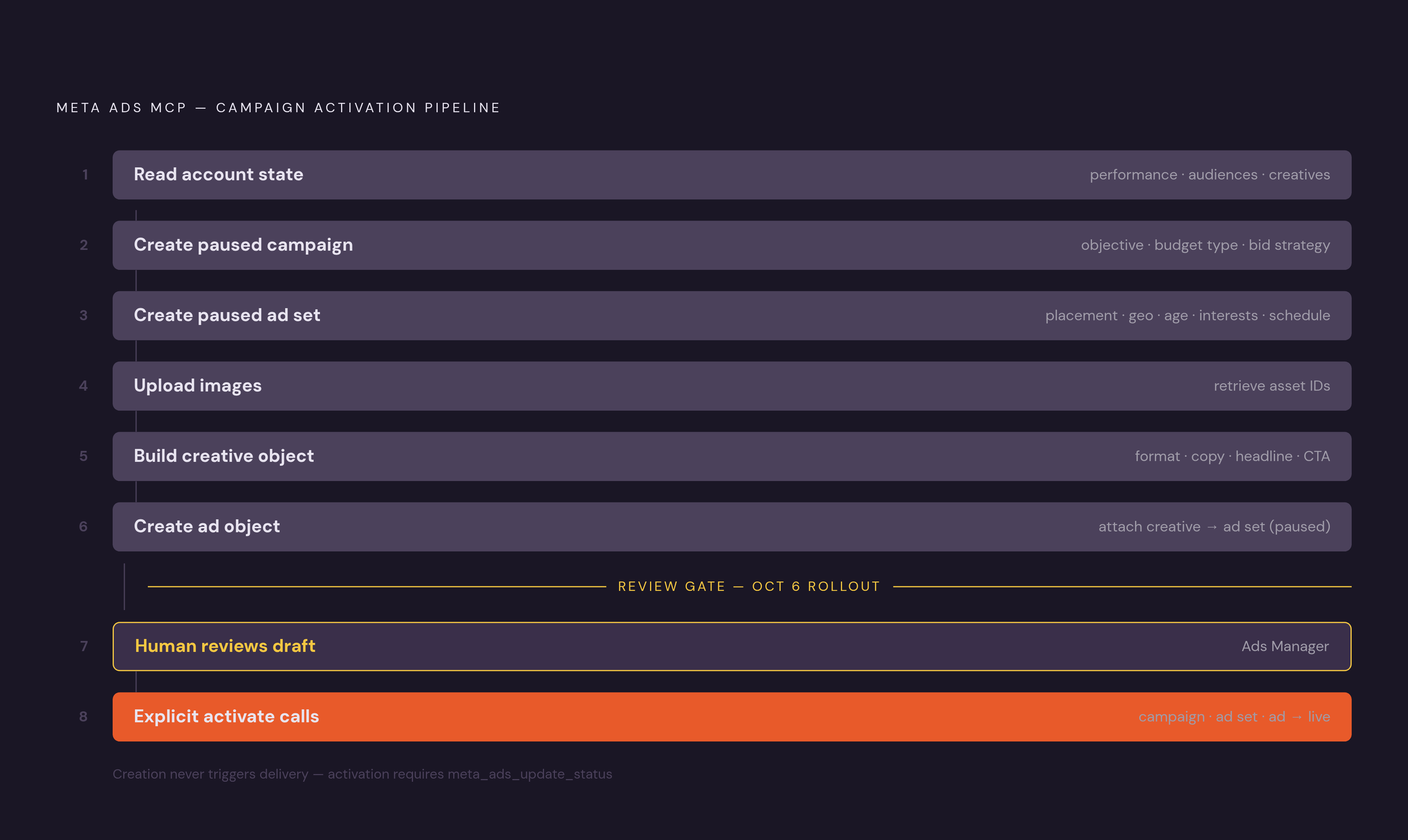
First, the agent reads the account state through reporting and list calls, retrieving current performance, campaigns, audiences, and creatives. Second, it creates a paused campaign with an objective, name, budget type, and bid strategy. Third, it creates a paused ad set. That call specifies Instagram placement, geography, age, gender, interests, optimization goal, conversion event, budget, and schedule, with an existing custom or lookalike audience referenced by its retrieved ID.
Fourth, the agent uploads images when the required assets are not already in the account library and retrieves asset IDs. Fifth, it builds the creative object with the chosen format, copy, headline, description, call to action, and instagram_actor_id. Sixth, it creates the ad object by attaching that creative to the ad set. The ad is still paused at this point.
Seventh, a person or agent reviews the draft structure. The October 6 rollout makes this checkpoint concrete because agent-staged work appears as a draft in Ads Manager. Eighth, explicit meta_ads_update_status calls activate the campaign, ad set, and ad.
Dynamic creative variants can be added when the creative is built, and a conversion lift study can come after the campaign is created. Recurring reporting calls can then monitor spend, CPA, ROAS, and frequency after launch. Each added step still depends on which tools the account has and what the agent is allowed to do.
Where the agent's tool access ends and what that means for campaign judgment
The MCP server supplies API access. It offers no access to the internals of Advantage+, the bidding algorithm, Andromeda’s audience-scoring infrastructure, or the Generative Recommender. The agent operates campaign structure by reading metrics and writing fields, without access to the system that decides delivery.
Account context is a different gap from account data. The server has no memory of why a budget floor exists, whether a learning phase is intentional, or whether a promotion changed the economics of a CPA target. A change log is not that reasoning. An above-target CPA therefore does not establish that pausing is correct, particularly with low conversion volume, attribution delay, learning, or promotion-related effects.
Speed can compound a weak interpretation into several related changes before a person notices the first one. The risk grows when an agent reasons across more than one ad set. The productive division of labor is a human strategist directing repeatable reporting, drafting, and creative variant generation through the agent. Activation, budget escalation, and structural changes remain judgment calls for a person.
The guardrails Meta enforces at the protocol level and how to layer additional controls
Paused creation and the budget-edit limits apply at the protocol level. Account-owner rules add a configurable enforcement layer. These rules can block actions even when an agent’s prompt asks for them, unlike instructions that depend on the agent choosing to comply.
Meta’s 12-rule Agent Rules Template, updated August 12, 2026, starts with two strict weeks that block campaign creation, ad set creation, targeting edits, and status edits before loosening incrementally. For account owners, the recommended staged approach begins with read-only access for two to three weeks, using the agent for reporting, anomaly flags, and ad-copy drafts. Write access follows only after its read-only judgment earns trust. At first, write access should cover only paused campaign drafts, leaving out live budget or audience edits.
That distinction also shapes the choice of server. Third-party community MCP servers that call the Marketing API directly are not covered by Meta’s server-enforced rules. Within the official endpoint’s enforcement boundary, rules define what the agent may execute, while draft review gives a person a checkpoint before launch.