Scoping Meta Ads MCP Permissions so an AI Agent Can Act Without Overreaching on Client Accounts
Set tight account-level guardrails before granting Meta's ad-API write access to agents.

Meta Ads MCP is Meta’s official connection for letting AI assistants report on and manage ad campaigns on Meta’s social platforms, including Instagram. It grants read-write access by default, and authorization covers the entire business portfolio. Safe use requires a narrower operating model, with minimum access for each task, account-level controls in Business Manager, and human approval before live changes.
Why Meta's MCP server is a different kind of risk than earlier ad-API integrations
Earlier unofficial wrappers and browser-script integrations risked account flags. Meta’s sanctioned path removes that integration risk, but official access is not limited access. The server supports reporting, campaign creation and editing, budget changes, delivery pausing, and catalog management. An assistant can operate campaigns.
Meta launched the server on April 29, 2026, opened it to any developer app on July 16, and shipped ad-account webhooks on July 22. Those webhooks replace polling loops so agents can react to ad-status changes in real time. Faster reactions cut both ways. They make useful intervention quicker while increasing the reach of an agent operating with excessive authority.
What the default configuration actually exposes before anyone changes a setting
The default permissions state is the immediate problem. Meta’s panel starts with 7 of 7 write actions turned on. These are editing or setting budgets, creating campaigns, creating ad sets, creating ads, editing targeting, editing creative, and editing status. Budget edits can change live spend without a human approving them, and permission to create campaigns also gives the agent power over spending. MCP-created campaigns do, however, start in PAUSED state, which provides an activation checkpoint.
That distinction does not make the default read-only. The connector’s OAuth grant is tiered as read-only, read/write, or read/write/financial, and the selected scopes determine which tools are exposed. There are no per-tool authorization permissions in the MCP connector itself. Account-level restrictions belong in the ad account and Business Manager.
Authorization also reaches beyond the account someone happens to be viewing. It happens at the business portfolio level, bringing every client account in that portfolio into scope at once. Ads Manager does not tell the operator that a connector is running on defaults they never chose. The risk comes from enabled authority.
Why the portfolio-level authorization model compounds the exposure for agencies specifically
For an agency, one authorization can cover work for separate clients. A client’s presence in the portfolio does not mean that client approved agent write access. Yet the authentication boundary follows the portfolio. That mismatch creates an accountability problem before the agent makes its first change.
Read-only reporting can do a lot of useful work with relatively little risk to how campaigns run. Writing to live campaigns is a different proposition because the agency remains answerable for the result. An agent that pauses a campaign at 2 AM on a Saturday may be useful under supervision. Without it, the same action becomes an agency error toward the client.
Meta’s proposed ads terms update adds a contractual dimension. Announced in October 2026, put on hold October 28, and rescheduled for November 20, it would make advertisers solely responsible for AI-generated ad content from Meta’s own features. A separate clause covers third-party tools the advertiser authorizes. The proposed terms place responsibility with the advertiser rather than the tool that produced the content, making permission design more than a technical preference.
The minimum-scope principle — mapping each agent action to the access level it actually requires
Scope access to the action. An assistant that can edit budgets does not need that authority to explain a performance change. Reporting pulls, anomaly flagging, performance summaries, and audience insights belong in read-only scope. That should be the starting point for every account. More access needs a business reason tied to the task at hand.
Drafting is a separate class of work. The agent can prepare campaign structures, creative suggestions, and budget-move recommendations for a human to put into use without getting open-ended power over live delivery. Execution goes further, covering live budget edits, campaign pausing, and ad-set creation that enters active delivery. Those actions need the narrowest guardrails because they change what the account does.
The adlibrary MCP setup guide recommends read/write but not financial for a first connection. That permits drafting and pausing without billing or spend-limit management, but it is still broader than read-only. Live budget edits are still possible without financial access. The framework must therefore track both the OAuth grant and which actions it allows on each account.
Context deserves the same restraint as permissions. The agent should get only the authorized context it needs for its task, with access kept to the systems that provide it. Excess context increases cost and leakage risk and can degrade reasoning quality. Does the task need a live budget edit, or a proposed edit that waits for approval?
A three-tier access model for configuring accounts in practice
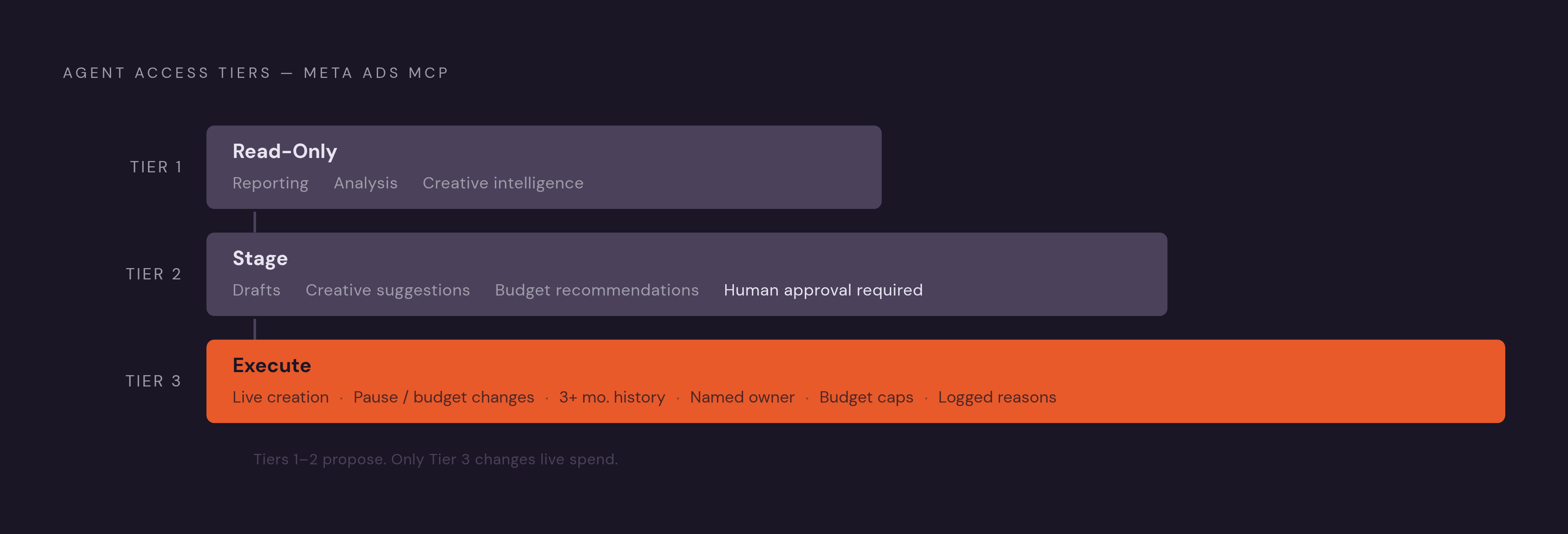
Apply the tiers per account. Tier 1 is read-only, so it allows reporting and analysis with no access to write actions. Tier 2 is Stage, allowing campaign drafts, creative suggestions, and budget recommendations where strategy and approval flows are clear. Tier 3 is Execute, allowing creation, pausing, and budget changes with guardrails. Only accounts with three or more months of historical data and a named human owner qualify for that final tier.
These are three operating tiers. Tier 2 needs a staged workflow in which changes affect live spend only after a human puts them into effect. Meta’s PAUSED default for MCP-created campaigns supports that boundary and should be preserved. Tier 3 adds execution authority under tighter controls and human supervision.
Two configuration locations need attention. Inside the AI connector at setup, select specific pages and portfolios by name rather than all current and future ones, and set available permission-tool controls to always allowed, blocked, or request approval. These assistant-side controls govern whether a tool call proceeds. They do not create per-tool OAuth scopes or isolate accounts inside a portfolio.
The second location is Business Settings → Integrations → Ads MCP Server. Open Details for each ad account and catalog to set its action switches and override the write defaults. Both locations must be configured. Account-level isolation still depends on Business Manager, because the connector cannot restrict which accounts inside an authorized portfolio can be reached.
Human review checkpoints that make write access auditable rather than autonomous
Tiered permissions define what an agent may attempt. Checkpoints define who accepts responsibility before it happens. The first gate is the PAUSED state of MCP-created campaigns, with a named human reviewing the structure before activation. Keep that gate for Tier 2 and early Tier 3 accounts. A draft is not an approval.
For mid-tier accounts, the assistant’s request approval mode gives a human a chance to step in. The agent proposes a write action, the platform surfaces the request, and a human approves before execution. Each write also needs a logged reason so the agency can reconstruct what changed and why. That record helps the agency answer to the client when it needs to explain an overnight change.
Human availability cannot be the only safeguard. Ad-set budget caps limit financial exposure even when an unintended change executes. A read-back verification step also belongs in the agent’s operating instructions, so the workflow includes checking the resulting account state after the attempted action.
The reporting workflow offers a useful pattern to extend. An agent can detect anomalies against prior periods, write a narrative summary, and recommend an action, with dispatch held for human approval. Applied to writes, the division stays clear. The agent identifies a possible intervention, and a person decides whether it should happen.
What to do about AI-generated creative compliance inside this framework
Permissions cannot tell whether an ad needs an AI disclosure. Meta’s rules have required disclosure since January 2024 when ads about social issues, elections, or politics contain AI-created or AI-altered photorealistic images, video, or realistic-sounding audio. A correctly scoped agent can still produce creative that needs that disclosure. Content review remains a separate obligation. Before agent-drafted creative enters Tier 3 execution, a named human needs to review the assets as well as the campaign structure.
That review must also cover platform-side modification flags and the Advantage+ text-rewriting opt-out. Approval of the agent’s draft is not the whole content checkpoint when platform-side rewriting is involved. The proposed terms update reinforces the need to review AI content regardless of which tool produced it. Read-only competitor creative intelligence can feed the brief before drafting, including the hooks and formats rivals run and for how long. That research belongs in Tier 1, but it cannot replace the later compliance decision.
Running the full framework across a multi-channel stack without fragmenting oversight
As of late 2026, Google Ads MCP is official, open-source, and read-only by design. It cannot change a bid, pause a campaign, or create an ad. Meta’s connection allows reading and writing, with write actions turned on by default. The same assistant therefore needs different controls for these two connections.
Microsoft Advertising’s server entered open pilot on June 17, 2026, with read-only access, and its waitlist was removed as of August 2026. Perpetua connects to Claude and ChatGPT through a read-and-recommend model. People review its recommendations and implement them through Perpetua, and its server requires a Perpetua account.
Separate tools can turn those differences into fragmented oversight. Each setup needs its own permission audit, workflow for approval, and compliance review. One shared interface is a practical way to keep those duties in view while allowing for the different permissions underneath. ChatGPT-style assistants and Slack integration in the same platform can tell the people involved and hold proposed actions until a human approves them.
A reporting agent retrieves channel data, normalizes it to a common schema, detects anomalies against prior periods, and writes a narrative with a recommended action. Dispatch waits for human approval. This applies read and stage scope across the portfolio without treating access to several platforms as permission to change all of them.
How do you connect your Meta advertising account to an AI assistant using MCP without overreaching?
Before opening the connector, classify every account in Business Manager. Start each at Tier 1, then check which accounts meet the rules above for Stage or Execute. Record the approval owner for staged work and the accountable human for execution. Make those decisions before OAuth. The connection’s defaults take effect once authorization is live.
At OAuth, choose read-only when the task needs only reporting. If the first connection requires drafting or pausing, choose read/write but not financial, as the setup guide recommends. Name only the specific pages, Instagram accounts, and portfolios being authorized. Do not mistake that selection for isolation within a portfolio.
Immediately after authorization, open Business Settings → Integrations → Ads MCP Server. Click Details on every ad account and catalog, then override the action defaults. Switch off all write actions for accounts not explicitly approved for Execute. Keep their proposals outside live execution. Do not leave this step for later.
Next, for Tier 2 workflows, set the assistant-side write controls that are available to request approval. An approval prompt does not override a blocked account action. Preserve paused campaign creation wherever that capability is authorized, and set ad-set budget caps for Tier 3 accounts. Add the logged-reason and read-back requirements to the agent’s instructions before it touches a live account.
For accounts where the agent will draft copy or assets, add a creative approval checkpoint covering AI disclosures, modification flags, and the Advantage+ text-rewriting opt-out. Run ads_get_ad_accounts first. Compare the returned accounts with the intended exposure. If they do not match, correct the Business Manager controls before proceeding. Run read-only queries next, with no write tool invoked until the access boundary and review gates are in place.