Facebook Ads Bulk Upload Options for Scaling Campaigns
Meta's CSV importer, third-party launchers, or AI tools: match each to where your workflow breaks.

Meta’s native CSV importer suits a controlled spreadsheet process, while third-party launchers address repeated setup and multi-account publishing. When creative production becomes the constraint, AI-native campaign creation belongs in the discussion. The right choice depends on where the workflow breaks.
Why manual campaign creation breaks down before you hit serious scale
With manual campaign creation, every new test needs another round of setup. More creative variations mean more ads to configure, name, and review, even when much of the campaign structure stays the same. That work grows with the testing program. Better habits can cut mistakes, but each task still has to be done again. Campaign creation becomes a structural bottleneck when the team can plan tests faster than it can prepare them for launch.
The constraint is not simply time spent clicking. Each repeated setup also requires the right creative, copy, destination, targeting, and budget to stay together. A campaign can be ready in principle while its configuration still needs work. Bulk creation cuts that repeated setup in three ways, through native import, CSV-and-API extensions, and dedicated bulk creation platforms. Each fits a different amount of work and a different workflow, so the wrong method can leave the team with another bottleneck.
What Meta's native bulk upload tool actually does and where it stops
The Hook Rate’s multi-account guide gives the path to Meta’s built-in import tool as Ads Manager → More → Import ads in bulk. The free tool accepts XLSX or CSV files, with each row representing a campaign, ad set, or ad. Blank ID columns create new objects, while existing IDs update them. Campaigns that have been imported are drafts before spend starts. AdFactory’s bulk upload guide identifies an important prerequisite, because the template uses asset hashes rather than file paths, so creatives must be uploaded to Business Manager before the CSV is built.
The Hook Rate guide identifies spreadsheet fragility as one failure mode. Column names must match Meta’s schema exactly, and headers for targeting, placement, and conversion change more often than the others. An edited header can silently break rows or trigger a blocking error. Account isolation creates a separate limit. Meta provides no native “copy campaign to another ad account” function, so copying requires an export, cleared ID columns, replacement account-specific values, and a re-import for every destination.
The same guide identifies missing naming automation and deduplication as the third failure mode. Names are entered manually, and duplicate rows become duplicate live objects that spend against each other without a pre-import check catching them. The fourth failure concerns budget placement. Legacy bulk files use ad set budgets by default, while Campaign Budget Optimization needs campaign-level budgets, so a mix of CBO and ABO structures can cause validation errors or silent overrides. There is also no visual preview before publishing, and import errors become visible only during validation.
How to make native bulk upload work reliably within its limits
The Hook Rate guide recommends starting with creative organization, grouping assets by angle, product, offer, format, and placement before opening the spreadsheet. Keep each row focused on one testing variable. Changing the creative, hook, CTA, and landing page together makes the result hard to interpret. Upload those organized assets before building the file so their hashes can be used in the template.
Next, prepare the words and destinations outside the CSV. The AdFactory guide recommends drafting primary text, headlines, destination URLs, CTAs, and UTM values before assembling the upload file. It warns that writing copy directly in the CSV has a high error rate from encoding issues. Add UTM parameters to the destination URL before upload, because bulk changes become much harder after ads go live. Google Sheets can serve as the planning and review layer, using headers that map directly to the Ads Manager CSV format.
Then check the file row by row. The Hook Rate guide recommends confirming that each creative exists, matches its row, and has dimensions suited to its placement, since Feed, Reels, Stories, and carousel have different requirements. Open each destination URL and keep status set to Paused unless a live launch is intentional. When reusing an existing Page post to preserve engagement, verify its Post ID. This review connects the planned campaign to the actual assets and destinations.
Finally, inspect the imported ads rather than treating a successful import as proof that everything is correct. The same guide recommends manually checking the first several rows before trusting a template with hundreds of rows, then reviewing drafts before publishing. Sheets can remain the auditable source of truth for the campaign configuration. But even when a team prepares everything without mistakes, there is a limit to how much it can upload across multiple accounts. It does not remove the account-by-account copying that native upload requires.
What to look for in a third-party bulk launcher before choosing one
For teams evaluating a launcher, the useful tests concern its controls as well as its publishing speed. The Hook Rate guide recommends checking format fidelity, whether the tool generates Meta’s schema, translates its own format, or uses direct Marketing API calls. A launcher should provide a preview of the mapped structure and an export of what it will send. Budget mapping deserves particular scrutiny. A mistranslated column can spread the wrong budgets without producing a visible error.
The next tests concern variations and naming. A launcher should be able to define a base ad and expand headline, copy, or creative variations without manual row duplication for every version. Names should have to follow a template such as [Client][Objective][Audience][Creative-ID][Date]. That makes later filtering by concept, audience, or launch date possible. Speed alone does not provide that structure.
The guide recommends checking whether proposed content and targeting can be compared against existing active ads, so a repeated file does not simply create more live campaigns. The launcher should also recognize each account’s CBO or ABO model and place budgets at the correct level. For multi-account work, test simultaneous publishing with automated substitution of Page ID, Pixel ID, and Custom Audience IDs. Sequential re-import is not the same capability.
The main third-party bulk launchers and what each one is actually built for
Third-party launchers fall into two useful categories, with different roles in the production process. CSV-and-API extensions suit mid-volume teams that already plan campaigns in spreadsheets and want API-level reliability without rebuilding that workflow. The spreadsheet remains the planning environment. These tools extend the route from a prepared campaign file to publication. Their fit depends on whether that route is the part slowing the team down.
Creative management remains manual in this tier. The AdFactory guide describes how the constraint shifts toward creative production once upload speed is solved. A team with enough prepared creative may need exactly that narrower improvement.
Dedicated bulk creation platforms are for teams with more to publish, including those making 50–200+ campaigns per week. They replace the spreadsheet workflow. For that category, the practical distinction is whether the platform supports the team’s variation logic, naming, budget models, duplicate checks, and destination accounts. Campaign count establishes the workload, but those capabilities establish the fit. The choice between the two tiers depends on whether the team needs a better publishing route or a different way to organize bulk creation.
Bulk upload across multiple ad accounts — the problem no single-account solution solves
For agencies and teams managing multiple client accounts, bulk upload involves more than multiplying the number of rows. A campaign configuration has values tied to one account. To move it to another account, those references have to change while the planned structure stays the same. A tool that handles one account quickly does not necessarily solve that translation.
The Hook Rate guide describes the native workaround as an export followed by clearing object IDs and replacing Page ID, Pixel ID, Custom Audience IDs, and Instagram Account ID before re-import. Every destination requires the full sequence. The cold-start copy that results has no performance history or post engagement. That makes cross-account copying different from continuing an existing campaign.
A multi-account launcher therefore needs simultaneous publishing, automated substitution of all account-specific values, and names that include client or account identifiers. Duplicate detection must also check both within and across accounts. The guide recommends a draft-review stage, with approval before publication and before spend starts across the accounts.
Where bulk upload ends and AI-native campaign creation begins
Bulk upload starts with campaign material that already exists. It can move prepared creative, copy, and structure into an account, but that does not solve a shortage of useful material to test. The AdFactory guide identifies creative volume and quality as the next constraint once trafficking speed has been addressed. The bottleneck moves upstream. For teams in that position, AI-native platforms represent a different tier because they generate campaigns.
That difference matters when the team still has work to do on creative production, targeting logic, and cross-channel coordination. Platforms that generate creatives, copy, and campaign structure together address an earlier stage of the process. They are not an automatic replacement for a capable launcher. If prepared campaigns are still waiting on publication, the trafficking problem remains the immediate one. If publication is fast but production cannot keep up, another upload improvement addresses the wrong stage.
AI connections also differ in what they can actually do. Some AI or MCP integrations expose only reads, which limits an assistant to reporting and recommendations. Write-capable connections let it execute the work it suggests. For a campaign-creation workflow, the relevant question is whether the connection can perform the required action.
Matching the right bulk method to your volume and workflow
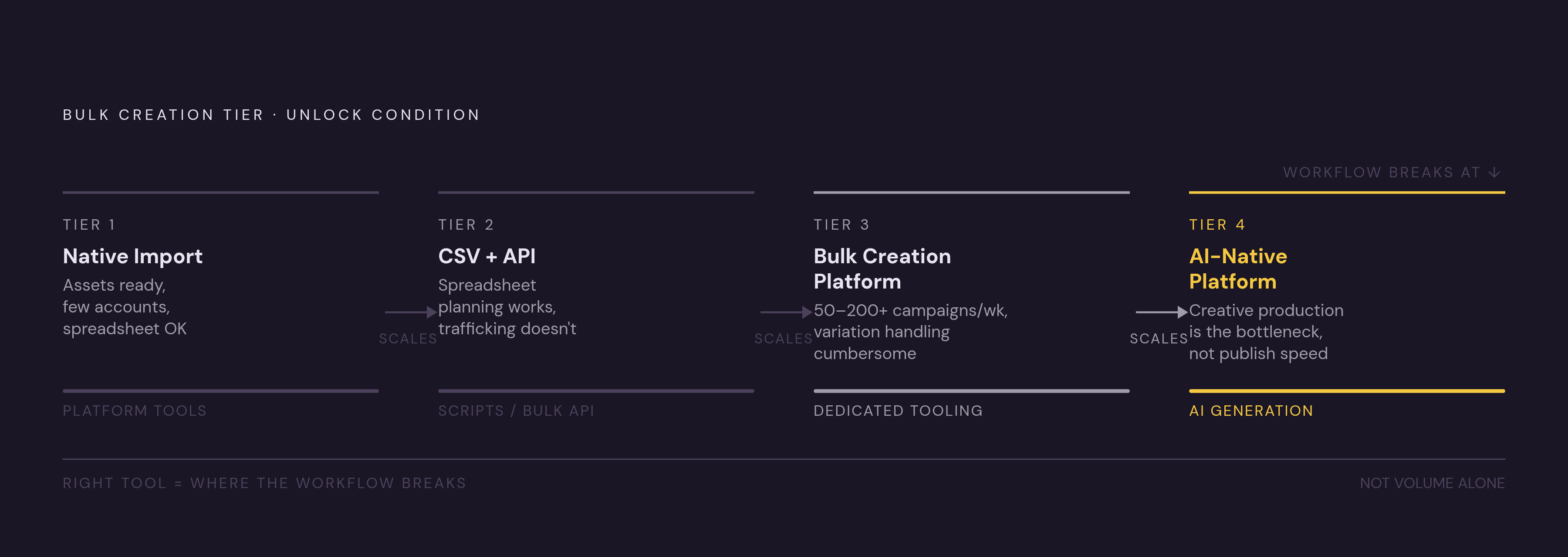
The practical decision starts with the work that is waiting. If campaign assets are ready, the team works with few accounts, and a careful spreadsheet process can handle the load, native import can work. Its preparation requirements are clear, and draft review provides a chance to catch mistakes before spending. If spreadsheet planning still works but manual trafficking does not, a CSV-and-API extension fits that narrower gap. There is no need to replace a planning process solely because its publishing step needs improvement.
If volume reaches the high-output tier and manual variation handling becomes cumbersome, dedicated bulk creation platforms become the relevant category to evaluate. Multi-account work adds a separate requirement. A team publishing across client accounts needs automated value substitution, account-aware naming, cross-account duplicate checks, and review before launch. Those needs apply even when campaign volume alone does not look exceptional.
If creative production is holding back the testing program, AI-native platforms that generate assets, copy, and structure address the actual constraint. For work spanning Google, Meta, LinkedIn, Reddit, and other channels, a single-interface platform can avoid the coordination overhead of separate bulk tools. The Hook Rate guide identifies the common failure as keeping a method designed for an earlier scale and patching it as volume grows. Those patches do not make the process scale gracefully. The choice should support the next level of work.